Devices
Firestick UK: Which Amazon Fire TV Stick Should You Buy?
The Firestick — Amazon’s Fire TV Stick, as almost nobody in Britain calls it — is by a considerable margin the most common streaming device in UK homes. It is cheap, it runs essentially every British app, and it turns any television with a spare HDMI port into a smart one. It is also the device most tangled up in the UK’s unlicensed IPTV problem, so this guide covers both the buying decision and the legal line.
The short answer
- Fire TV Stick 4K Max is the one to buy if your TV is 4K.
- Fire TV Stick HD is fine — and better value — on a 1080p set.
- Every major UK app is here: iPlayer, ITVX, Channel 4, My5, NOW, Sky Go.
- The stick is legal. A stick sold pre-loaded with unlicensed IPTV is not.
Amazon has sold the Firestick in Britain for over a decade, and its dominance here is not really about the hardware. It is about price and timing: the stick is heavily discounted several times a year, it works with every service a British household actually uses, and it rescues perfectly good televisions whose built-in software has gone stale.
There are now several models, they look almost identical, and the differences between them are genuinely confusing on a retail shelf. This Firestick UK buying guide sorts out which one you need, what each is worth paying, and what the stick can and cannot do — including the two things it will not do at any price.
It also addresses the elephant in the room. Search "firestick" in the UK and the autocomplete fills with "jailbreak", "loaded" and "crackdown". Those searches are about installing unlicensed IPTV, and we cover the legal position plainly rather than pretending the question is not being asked.
Which Firestick should you buy?
Three models matter for most buyers, plus the Fire TV Cube for people who want something more substantial. Amazon calls them Fire TV Sticks; almost everybody in Britain calls them Firesticks, and the shops use both — so a Firestick 4K and a Fire TV Stick 4K are the same device under two names.
| Model | Typical UK price | Max output | Wi-Fi | Storage | Buy it if |
|---|---|---|---|---|---|
| Fire TV Stick HD | ~£40 | 1080p | Wi-Fi 5 | 8 GB | Your television is 1080p, or it is for a bedroom. |
| Fire TV Stick 4K | ~£60 | 4K HDR, Dolby Vision | Wi-Fi 6 | 8 GB | You have a 4K set and want to spend the minimum. |
| Fire TV Stick 4K Max | ~£70 | 4K HDR, Dolby Vision | Wi-Fi 6E | 16 GB | You want it to still feel quick in three years. |
| Fire TV Cube | ~£140 | 4K HDR, Dolby Vision | Wi-Fi 6E | 16 GB | You want Ethernet built in and hands-free Alexa. |
Why storage matters more than the spec sheet suggests
This is the single most underrated difference. Every app you open stores artwork, guide data and scraps of video to feel quick, and on an 8 GB stick that clutter eventually leaves Fire OS short of room to work.
The symptom is a stick that was fine when you bought it and is sluggish eighteen months later. It is not the processor wearing out; it is storage pressure. The 16 GB on the 4K Max buys you considerably longer before that becomes noticeable, and when it does, clearing the cache resolves it.
What is a Firestick and what does it do?
An Amazon Firestick is a small computer that plugs into an HDMI port and runs Fire OS, Amazon’s fork of Android. It draws power over USB — ideally from the mains adapter supplied rather than a port on the television, which frequently cannot deliver enough current.
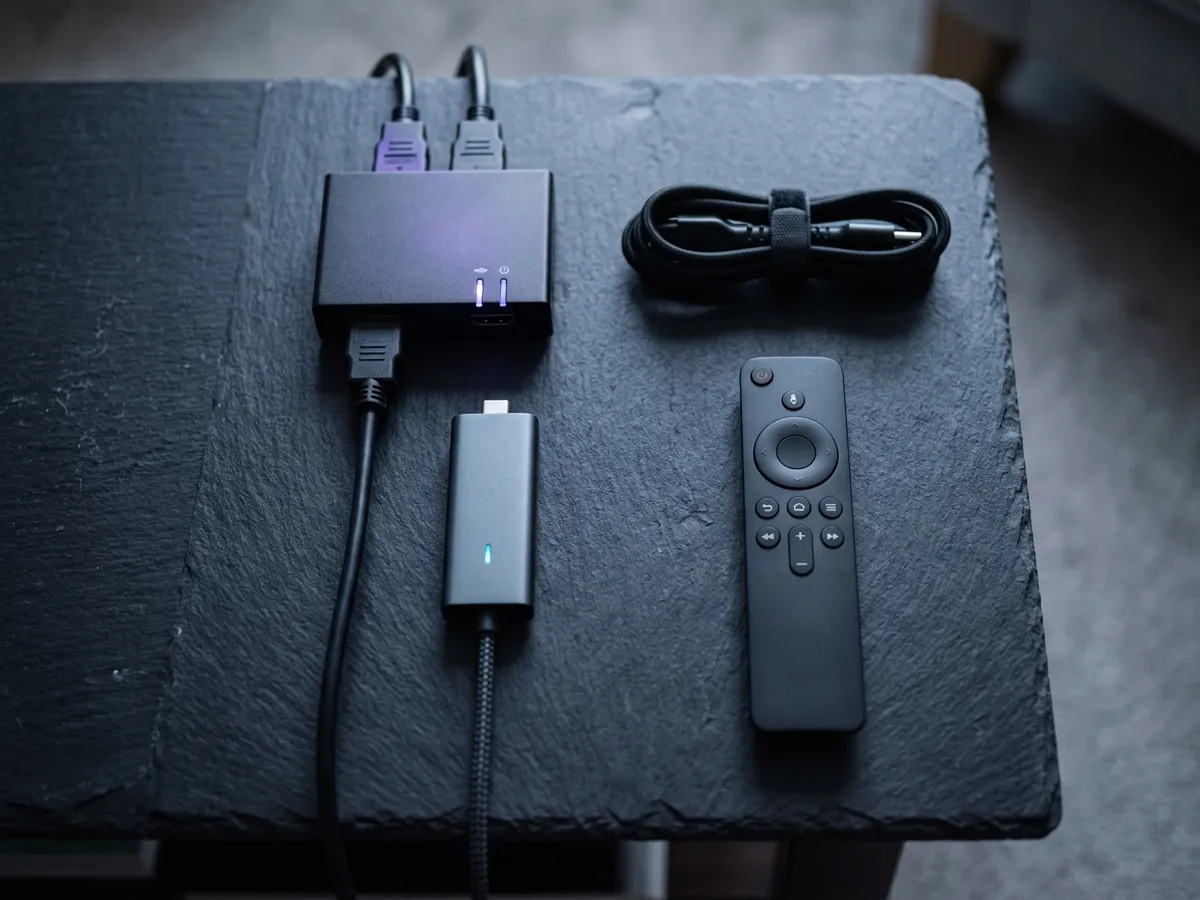
What is in the box
- The stick
- HDMI plug, with a short extender for tight spaces
- Alexa Voice Remote
- Bluetooth, with a microphone and TV controls
- Power
- USB cable and mains adapter — use the adapter
- Batteries
- Two AAA, included
- Not included
- Ethernet — needs a separate adapter on stick models
Setup takes about five minutes: plug in, connect to Wi-Fi, sign in to an Amazon account, install your apps. The remote pairs automatically, and if it ever stops responding, re-pairing it takes seconds.
The Firestick apps that matter in the UK
Firestick apps are the platform’s real advantage over every competitor in Britain, and the UK catalogue is comprehensive. Everything a British household is likely to want is on the store, installed in the ordinary way, with no sideloading involved.
- Free UK catch-up — BBC iPlayer, ITVX, Channel 4, My5, UKTV Play, STV Player.
- Paid UK television — NOW, formerly NOW TV, Sky Go for existing Sky customers, Discovery+, TNT Sports.
- Global streaming — Netflix, Disney+, Prime Video, Apple TV+, Paramount+.
- Music and radio — Spotify, Amazon Music, BBC Sounds, TuneIn.
- Utilities — Plex, Jellyfin, VLC, and a browser.
How do you make a Firestick faster?
Five things make a measurable difference, and the speed a stream actually needs covers the bandwidth side. Power it from the mains adapter rather than the television’s USB port, use the supplied HDMI extender, connect to 5 GHz Wi-Fi or wire it with an Ethernet adapter, disable the home-screen video autoplay, and clear the app caches every few months.
Five things make a measurable difference, and most people do none of them.
Use the mains adapter, not the TV’s USB port
A television USB port often supplies less current than the stick needs. The symptom is random reboots and Wi-Fi dropping under load, and it gets misdiagnosed as a faulty stick constantly. Use the supplied adapter into a wall socket.
Use the HDMI extender
The little extension cable in the box is not padding. Plugging the stick directly into a recessed HDMI port surrounds its aerial with metal, which measurably degrades Wi-Fi. The extender moves it clear.
Connect to 5 GHz, or wire it
If your router publishes separate 2.4 and 5 GHz network names, use the 5 GHz one. For 4K, an Ethernet adapter is better still — around £15 and it removes the most common cause of buffering entirely.
Turn off the video preview autoplay
The home screen plays trailers automatically, consuming bandwidth and slowing navigation. Settings → Preferences → Featured Content, and disable both video and audio autoplay.
Clear caches every few months
Especially on an 8 GB model. It is the difference between a stick that ages well and one that becomes unbearable. Our step-by-step guide covers the routine.
25
Mbps for 4K
Per stream, sustained.
16 GB
On the 4K Max
Double the plain 4K model.
5 min
Setup time
Unbox to watching.
~£15
Ethernet adapter
The best £15 you can spend on it.
Are jailbroken Firesticks illegal in the UK?
The stick is legal; what is loaded onto it may not be. A standard Fire TV Stick is an ordinary consumer device. The serious offence, under section 297A, falls on anyone selling one set up for unauthorised pay-TV and can mean prison; a buyer faces a lesser offence punishable by a fine.
This needs addressing directly, because it is the single largest cluster of Fire TV Stick searches in Britain and most of what is written about it is either evasive or wrong.
What "jailbreaking" means in this context is enabling developer options and sideloading applications that are not in Amazon’s store — typically to access unlicensed IPTV subscriptions or piracy add-ons. Sideloading itself is a feature Amazon provides, and there are legitimate reasons to use it, such as installing Jellyfin or a media player Amazon has not listed.
What is illegal is what those sticks are usually loaded with. Selling, advertising or supplying a stick configured to get round pay-TV encryption is a criminal offence under section 297A that can carry up to ten years’ imprisonment. That applies squarely to selling a "fully loaded" Fire TV Stick, and people in Britain have received custodial sentences for exactly this.
For buyers the offence is different and lesser — section 297 covers dishonestly receiving a broadcast to avoid a charge, and carries a fine — but the practical risks are more immediate than the legal one:
- They stop working during football. Rights holders obtain live High Court blocking orders that cut off infringing servers in real time during matches. This is why unlicensed services fail precisely when you wanted them.
- Loaded sticks carry malware. Devices sold pre-configured have repeatedly been found running modified firmware and unvetted apps, on your home network.
- There is no recourse. No refund, no support, no chargeback route worth attempting against an anonymous seller.
- Raids take the seller’s records as well as the kit, and names on those records have been followed up.
The full legal analysis — which statutes apply, who actually gets prosecuted, and what enforcement looks like now — is on our page covering whether IPTV is legal in the UK. If what you actually want is football, the legal routes are set out in our comparison of UK services, and a rolling monthly Membership taken seasonally costs less than most people assume.
For a fuller treatment of what a Fire TV Stick can and cannot legitimately do with IPTV — the licensed apps, the lawful uses for a player, and the sideloading risk profile — see our guide to running IPTV on a Fire TV Stick.
Is a Firestick better than Roku or Chromecast?
On value, yes; on day-to-day use, not always. The Firestick is cheaper and runs more apps, but its home screen pushes Amazon’s own content hard. Roku is plainer and calmer — Firestick vs Roku decided weighs the two properly — and Apple TV 4K beats both at more than twice the price.
| Fire TV Stick 4K Max | Roku Streaming Stick 4K | Apple TV 4K | Google TV Streamer | |
|---|---|---|---|---|
| Typical price | ~£70 | ~£50 | ~£150 | ~£100 |
| UK catch-up apps | All | All | All | All |
| Interface | Ad-heavy | Clean, neutral | Best | Good |
| Ethernet | Adapter needed | Adapter needed | Built in | Built in |
| Voice assistant | Alexa | Basic | Siri | Google Assistant |
| Sideloading | Yes | No | No | Yes |
| Best for | Value and app breadth | Simplicity | Quality, if budget allows | Google households |
The honest assessment: the Fire TV Stick wins on price and app breadth and loses on interface. Amazon’s home screen is increasingly dominated by promoted content, and there is no setting that fully removes it. Roku is the cleaner experience for anyone who finds that irritating; Apple TV 4K is the best device outright and costs more than twice as much.
For most British households the stick remains the right buy, largely because it is the one that goes on sale for £30 twice a year. Our full streaming device comparison covers the rest of the field, and the head-to-head against Roku settles the closest call.
What accessories are worth buying for a Firestick?
Three, costing under £30 between them. An Ethernet adapter at around £15 removes the commonest cause of 4K buffering outright and is the best value upgrade available. Rechargeable AAA cells pay for themselves within a year on the always-on Alexa remote. The third is already in the box: the HDMI extender.
Three cost less than £30 between them and materially improve the device. The rest of the accessory market is largely unnecessary.
| Accessory | Roughly | Why |
|---|---|---|
| Ethernet adapter | ~£15 | Amazon sells an official one that combines power and Ethernet in a single unit, so the stick still needs only one socket behind the television. |
| Rechargeable AAA cells | ~£10 | The Alexa remote is always on and gets through alkaline batteries steadily. A set of rechargeables pays for itself within a year. |
| Short HDMI extension | Included | You already have one in the box. Use it — it moves the aerial clear of the television chassis. |
| Remote cover | ~£6 | Genuinely useful if there are children in the house, mainly because it makes the remote harder to lose down the sofa. |
What is not worth buying: third-party remotes (the official one is better), USB storage expansion (Fire OS handles external storage poorly), and "performance boosting" apps, which do nothing a cache clear does not do better.
Do you need a Firestick if you have a smart TV?
It depends on the television’s age. Under two years old, use the built-in apps. Two to four years, a stick is noticeably faster but optional. Over four years — or if apps have stopped updating — buy the stick: manufacturers abandon built-in platforms long before the panel wears out.
A fair question if your set already has Netflix and iPlayer on it, and the answer changes with the age of the television.
Manufacturers stop updating built-in smart platforms long before the panel wears out — often within three or four years of a model going off sale. When that happens, apps get slower, then stop receiving new features, then eventually disappear from the store altogether. The panel is fine; the computer attached to it has been abandoned. Our explainer on how long each smart TV platform stays supported covers which platform your set runs and how long each tends to be supported.
A £40 stick replaces that computer. It receives updates for years, it runs the current version of every app, and it costs a fraction of a new television. For any set older than about four years it is close to an automatic recommendation.
- Television is under two years old — use the built-in apps. A stick adds little.
- Two to four years old — a stick will be noticeably faster, but it is optional.
- Over four years old — buy the stick. It is the single cheapest meaningful upgrade available.
- Apps missing or refusing to update — buy the stick. This is support ending, and it does not come back.
The one exception is Freely, which is built into the television platform on newer sets and cannot be added by a stick. If your set has Freely, that part of the experience stays with the television regardless.
The rest of our device guides
The Firestick is one of four categories covered in our streaming device guide. If it is not the right fit, these are the alternatives worth knowing about.
- Freely TV boxes — the one thing a Firestick genuinely cannot do, because Freely is a platform rather than an app.
- The NOW TV Stick and Box — cheaper, far narrower, and usually the wrong purchase unless it arrives free with a Membership.
- Running IPTV on a Firestick — what the stick genuinely plays, the lawful uses for a player app, and where the legal line sits.
What are the most common Firestick problems?
Six recur: a remote that will not pair, random reboots from an underpowered TV USB port, 4K buffering over Wi-Fi, general slowness after a year of cache build-up, no sound through a soundbar, and an app missing from the store. All six have fixes, and most take under five minutes.
| Problem | Cause | Fix |
|---|---|---|
| Remote not working or not pairing | Bluetooth pairing lost, or flat batteries | Hold Home for 10 seconds to re-pair. Full walkthrough. |
| Random reboots | Underpowered from a TV USB port | Use the supplied mains adapter into a wall socket. |
| Buffering on 4K | Wi-Fi, or the stick behind a metal TV chassis | Use the HDMI extender, move to 5 GHz, or add an Ethernet adapter. |
| Everything slow after a year | Storage full of app cache | Clear caches and uninstall unused apps. Guide here. |
| No sound through a soundbar | HDMI-CEC or audio format mismatch | Set audio output to stereo or PCM to test, then step back up. |
| App missing from the store | Regional availability | Confirm the Amazon account is set to the UK. Freely is not available at all. |
Frequently asked questions
What is a Firestick, and which one should I buy?
A Firestick is Amazon’s streaming stick: it plugs into an HDMI port and turns any television into a smart one. Buy the Firestick 4K Max if your set is 4K, and the Fire TV Stick HD if it is 1080p. The plain 4K model exists to hit a price point — the £10 step up to the Max buys double the storage and a faster processor, which determines how well it ages.
What is the difference between Fire TV Stick 4K and 4K Max?
The Firestick 4K Max has a faster processor, 16 GB of storage against 8 GB, and Wi-Fi 6E rather than Wi-Fi 6. Picture output is identical — both do 4K HDR and Dolby Vision. The storage is the difference that matters day to day, because app caches on an 8 GB device eventually crowd out the space the system needs, which is why the Max still feels quick years later and the plain 4K does not.
Are Firesticks legal in the UK?
Yes, completely. A Fire TV Stick is an ordinary consumer product and buying, owning or using one is lawful. The crime sits with whoever sells a "fully loaded" stick — one set up for unlicensed pay-TV — and it can carry up to ten years in prison.
Can I get BBC iPlayer on a Firestick?
Yes. BBC iPlayer, ITVX, Channel 4, My5, UKTV Play and STV Player are all in the UK Fire TV app store and free to install. You need a TV Licence to use iPlayer, as you would anywhere.
Can I get Freely on a Firestick?
No — not on any Fire TV Stick, whatever its age. Freely ships on Fire TV televisions, but the plug-in sticks sit outside that arrangement. On an older television the route is a dedicated Freely box.
Why does my Firestick keep restarting?
Almost always insufficient power. Many people plug the stick into a USB port on the television, which frequently cannot supply enough current under load. Use the mains adapter supplied in the box into a wall socket, and the reboots usually stop immediately.
How do I make my Firestick faster?
Clear app caches, uninstall apps you do not use, disable the home-screen video autoplay in Settings → Preferences → Featured Content, use the HDMI extender so the aerial is clear of the television chassis, and connect to 5 GHz Wi-Fi or add an Ethernet adapter.
Which Firestick apps do I actually need in the UK?
The free British catch-up apps cover most viewing: BBC iPlayer, ITVX, Channel 4, My5 and UKTV Play. Add whichever paid services you already subscribe to. Every mainstream UK app is on the Amazon store and installs normally — sideloading is never required for a legitimate service, and being asked to sideload is the clearest sign a service is not one.
What is the best Firestick for a 4K TV?
The Firestick 4K Max. It matches the plain Firestick 4K on picture — both do 4K HDR and Dolby Vision — but doubles the storage to 16 GB and adds a faster processor. Storage is what determines whether a stick still feels quick in three years, so the £10 difference is the best value in the range.
Do I need Amazon Prime to use a Fire TV Stick?
No. You need a free Amazon account to sign in and install apps, but Prime is not required. Without it you simply do not get Prime Video content included — every other app works normally.
This page is part of our Devices hub.
See all devices guides